
At the time of writing this article, a lot of developers are using coding AI to help them write code. I’m one of them, and I use coding AI a lot, often hitting the five-hour limit. It’s a frustrating experience, because you have a lot of work to do and your friend (coding AI) just refuses to work in the middle of your routine. So I started looking for a way to control the five-hour limit, and I found a simple trick.
The Problem
Let’s say you have two or three work routines in a day: morning, afternoon, and evening (if you are a workaholic :D). We often start work from 9AM to 5PM, the classic 9-to-5 style, but you may not actually touch the code until around 10:30AM or 11AM because there is usually at least one meeting at the beginning of the day. If you work intensively with coding AI at that point, you can hit the Five Hours Limit in the middle of your afternoon routine, maybe around 1PM or 2PM, and then you have to wait until 4PM to continue working. Then you either have to work late or lose one routine of the day: the evening routine. Neither option is good.
The Solution
What if I said that the Five Hours Limit starts counting from the moment you send your first request, no matter what that request is? Then the solution is simpler than you think: schedule an early request in the morning.
For example:
- At 8AM, you schedule a request with Claude Code, Codex, or any similar tool. Then your Five Hours Limit will end at 1PM.
- In the first case, if you have lots of meetings in the morning, you can do some lightweight coding work and never hit the Five Hours Limit before lunch. That’s good, because you can start working seriously anytime in the afternoon.
- But if you need to work intensively with the codebase, you may hit the limit around 11AM or 12PM. That’s not ideal, but at least you can take your lunch break and get back to work at 1PM. You can then work until 6PM and take another break before starting the evening routine. But I don’t suggest you do that, take a rest :D
Claude Code setup
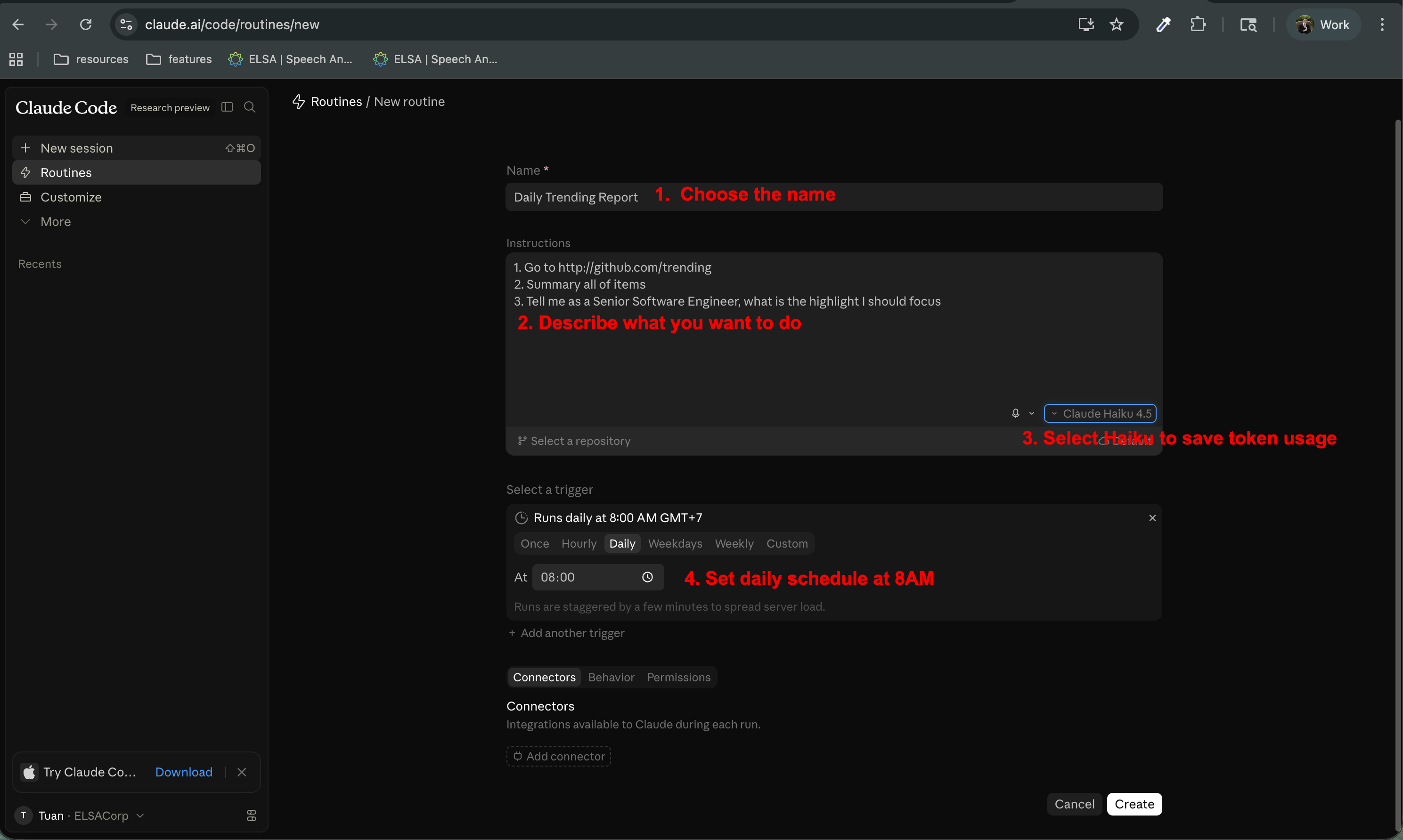
There are many ways to schedule this, but I’m too lazy to do anything complex, so I just use Claude Routine. Here’s how to do it:
- Go to the Claude Routine page
- Enter the routine name, for example “Daily Trending Report”
- Describe what you want the routine to do in the instructions textarea, and choose something actually useful, not just “Hello World” :D Make every token count.
- Select the
Haikumodel to save the token usage. - Set the schedule to “Daily” and set the time to 8AM, or any time you want to start your working routine.
Here is a screenshot of my setup:
Enjoy your coding sessions without worrying about the Five Hours Limit!